Posts

Showing posts with the label GIS 5050/L- Introduction to GIS

M6 - Georeferencing

Image
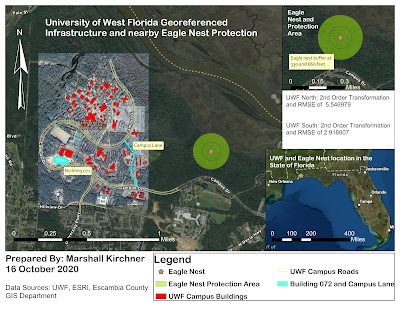
  University of West Florida Georeferenced Infrastructure and nearby Eagle Nest Protection Three Dimensional Map Showcasing the University of West Florida Campus The final laboratory assignment of this course was informative, exciting, and all-encompassing. I was able to apply concepts learned from previous labs while continuing to expand upon my GIS knowledge. This assignment resulted in the creation of two separate maps, one being of the final georeferenced image of UWF's Campus (and an inset map of the eagle nest), and the other being a 3D map of UWF's campus. I was able to use georeferencing to overlay pictures to create the UWF campus map and Heritage Hall's planning image. This was a skill that I greatly enjoy utilizing, as I find it very pleasing watching images align after placing control points. I used the editing tab to add a building (079) and road (Campus Lane) to be used in both the final campus and 3D map. For the 3D map, I was able to learn how Lidar imagery ...

M5 - Add XY and Geocoding

 Link to web map http://arcg.is/1yjyuv0 This two part lab was very informative, interdisciplinary, and engaging. I learned a multitude of new GIS concepts throughout this lab that will certainly be applicable to my future coursework and career. Starting out with creating and manipulating data in the excel spreadsheet allowed me to understand how the data should look for implementation into ArcGIS Pro and was good practice in brushing up on my Excel skills. After doing so and importing the data into the map, I was able to use an address locater and geocode to produce a basic map of all of the schools within Brevard County, Florida. The usage of the different tools and skills that were utilized in this lab were all very exciting and fun to work with. What I had trouble most with was exporting my map to a web map version, which I have learned the basics of through much troubleshooting. Essentially, the basemap and the layers I had created were of two different projections and I simply...

M4 - Vector Analysis

Image
  Vector Analysis Map This lab involved utilizing a variety of tools including utilizing new tools that I have not previously worked with: the buffer tool and the overlay tools. Working with these tools, I was able to produce a map that shows optimal campsites in Mississippi's De Soto National Forest. This was done utilizing a variety of queries (both attribute and location) that allowed me to create buffers around rivers and streets throughout the forest. I really enjoyed working with the queries and new geoprocessing tools, as they allowed me to utilize spatial data analysis to help answer a question. It is becoming more and more clear how GIS can be used in a variety of real-world applications, and applications like this could even be useful for one's own personal use if they ever wanted to go camping in a place like De Soto National Forest. Through creating the map, I also used a data layer that consisted of conservation areas around the forest (that contained plants and an...

M3 - ArcGIS Data Collector and Introduction to Projections

Image
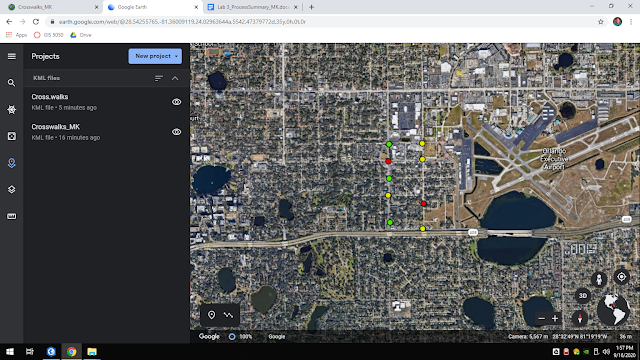
ArcGIS Data Collector Map The first portion of this lab assignment involved using the ArcGIS Data Collector application on my phone to collect data points around my area. This data was to be based on public safety features of our choice, so I chose crosswalks. Upon walking around, taking pictures of my data, writing descriptions, etc., I was able to come up with nine data points on my app. I linked my data back to my map via the ArcGIS Online software, and the data appeared on the map. I then used this data to make various KMZ files and was even able to upload these files to Google Earth to also showcase my data on a different platform. My favorite parts of this lab were being able to collect my own data out in the field and becoming better acquainted with other GIS software platforms (other than ArcGIS Pro). I initially struggled with uploading my KMZ files to Google Earth, but was able to find success after reviewing the discussion board for this module and finding another student ha...

M2 - Cartography

Image
  Cartography Map For this week's laboratory assignment, I created two maps. The first of which showcases the University of West Florida's location within Escambia County. The second is an inset map with Escambia County's location in Florida. I was able to use many more features of ArcGIS pro, including:  Clipping Bookmarking Inserting text and pictures Legend Scale Compass Symbology Throughout the assignment, I made many choices and ultimately tailored the map to look the way I thought would best represent the data. I am very proud of my final map design! Although it looks fairly simple, it took a great amount of time troubleshooting and playing with the features to get the map to exactly the point in which I want ed it. Being able to make many cartographic choices that altered the overall appearance of the final map was my favorite component of this lab assignment. My biggest struggle was keeping my files organized while working through the lab. I find that it is best to...

M1 - Overview of ArcGIS

Image
  First Map Created Using ArcGIS Pro I greatly enjoyed becoming better acquainted with ArcGIS Pro and being able to create my first map all on my own. It was quite exciting seeing how a few clicks could change the appearance of the map in its entirety. To produce the map above, I imported data including cities and countries and used symbology to enhance some of the features on the map. I chose a red gradient for the countries, as I felt it showed the contrast of them from one another and the ocean. I also lowered the size of the dots used to represent cities, as the initial size was too large and the cities would blur together and take up nearly the whole map.  Some of the highlights I experienced while working on my first lab would include: learning how to navigate and utilize the files used to create the maps, playing with the various ArcGIS Pro features and figuring out my own mapping style, and taking much less time creating the map than I initially anticipated it would re...